Platform Module Overview
Introduction
The Platform module forms the foundational layer of bLink. It provides the essential information and infrastructure required to establish and operate connections between Service Users and Service Providers. All information exposed through this module, such as participant metadata, technical capabilities, routing details and permitted connections is maintained by SIX and must be consulted before initiating any interaction on bLink.
It is mandatory for all integrations on bLink and must be used whenever participants verify compatibility or interact with another participant through the bLink APIs.
The Platform module provides the information required for participants to operate on bLink. It allows them to:
- verify whether another participant is active, certified, and technically compatible,
- retrieve supported use cases, versions and their corresponding scopes,
- check which connections are permitted or whether a participant is blocked,
- obtain logos, icons, URLs and product or company names to display the participant within their GUI,
- and validate the availability of the bLink platform through health diagnostics.
Only participants with matching and certified use cases and versions may interact. The Platform module therefore acts as the central source of truth for operational decisions on bLink.
The module exposes three API tags. Directory, Diagnostics and Routing:
- Directory: provides participant information, technical capabilities, and connection permissions.
- Diagnostics: confirms platform availability and helps identify the source of operational errors.
- Routing: Provides routing-related information used internally by bLink (documented separately).
Directory
The directory contains the authoritative registry of all participants in each environment (XE, XP and Production). Information is kept up to date by SIX and must be used by participants to ensure correct operational behaviour.
Access and expected usage
- Service Users retrieve Service Providers (list or by providerId).
- Service Providers retrieve Service Users (list or by clientId).
The bLink Platform always validates at runtime whether a Service User is allowed to access a specific path or service. Participants use the directory mainly for their own technical processes, such as matching use cases and versions, preparing consent flows or presenting counterpart information in their user interfaces. The directory is updated regularly and must therefore be used dynamically. A periodic refresh, for example once per day, ensures that changes in certification, status or permitted connections are correctly respected.
Information in the directory includes:
- Lifecycle status and ID of participants,
- Company and product details, URLs, logos and icons for UI/UX purposes,
- Contacts for B2B communication,
- Use cases, versions and scopes supported by the participant,
- Consent Flow configuration and authorization endpoints.
Participants may use this information for operational decision-making, such as determining compatibility and for visual presentation in the user interface.
Pagination and query parameters
The directory list endpoints support offset-based pagination. The default page size is set to 20 entries.
- offset: starting position of the result set
- limit: maximum number of entries returned in the response
Example: GET /directory/service-providers?offset=20&limit=20
Additional optional parameters include:
- status: filter by participant status
- embed: controls whether additional assets such as logos or icons are included.
These parameters allow participants to retrieve only the data they require and to optimize network usage when processing large directories.
Lifecycle Status
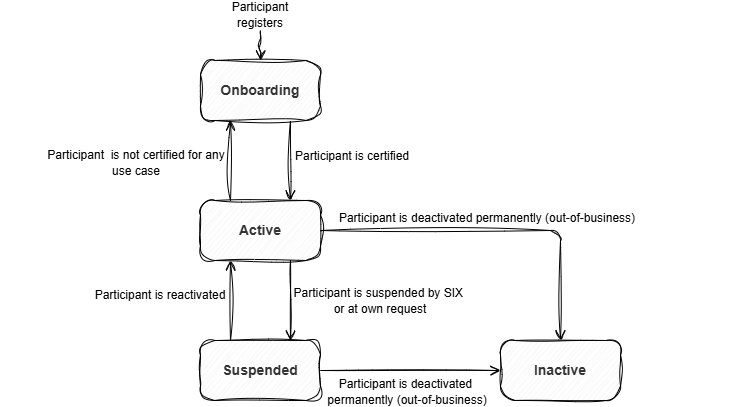
Participants on bLink have a defined status that indicates whether they are admitted for use, temporarily unavailable or no longer active on the platform. The status determines how a participant can be used in a given environment.
| Status | Description |
|---|---|
| ONBOARDING_DEVELOPMENT | The participant is in the onboarding process for bLink, potentially undergoing certification. (Participants with this status are only visible in the directory of the bLink test environments.) |
| ACTIVE | The participant is certified and productive for at least one use case. |
| SUSPENDED | The participant has been temporarily suspended by SIX or by itself. Requests from/to suspended participants will be rejected by the platform. |
| INACTIVE | The participant is no longer active. |
The image below presents the participant status and flow on bLink.
Participant Identifiers
Every participant in bLink is assigned a unique identifier that includes the environment indicator and the participant type. X indicates test environments (XE or XP) and P indicates production.
-
Service Providers (e.g., banks and other regulated financial institutions) receive identifiers of the form
IID{X/P}nnnnn. The numeric part always contains the institution’s clearing number or another institution-specific reference. -
Service Users receive identifiers of the form
CID{X/P}nnnnnnnnnn. The numeric suffix is environment-specific and uniquely assigned to each participant.
These identifiers appear in the directory and are used throughout all interactions on bLink. They serve as the routing and addressing mechanism for API calls, consent flows and all other operational exchanges on the platform.
Use cases, versions, scopes
bLink services are structured into independent use case modules, each provided in one or more versions. This modular design allows the platform and participants to support several versions of the same use case in parallel. New versions can be introduced without interrupting existing ones. Participants can conveniently upgrade to newer versions, while older versions remain available during the transition period.
Before establishing a connection, Service Users must verify that the Service Provider supports the use case and version they intend to use. A connection may only be established if all the following conditions are met:
- the use case matches,
- the version matches exactly, for example v4 with v4,
- the use case is certified,
- the connection is permitted and not blocked.
Attempts to mix incompatible or mismatched versions will result in technical errors during API calls.
Scope alignment
Scopes are listed in the directory within each supported use case. They indicate which read and write permissions are associated with that use case. These scopes are used when requesting consent from a provider. Further details are explained in the Consent Flow documentation.
Important Note on API Endpoints
Information about the actual API endpoints of a Service Provider is not part of the directory. bLink uses these URLs internally for traffic routing only. They are not exposed to participants.
Examples of internal routing URLs.
- https://api-path.service-provider.ch:443/blink/a2a/v1/
- https://api-path.service-provider.ch:443/blink/owa/custodyservices/v1/
Consent Flow information
Each participant entry in the directory contains a consent flow item that specifies the consent flow type and version to be used. It also includes the endpoint information required to steer the user through the OAuth-based consent process between the Service User and the Service Provider.
The consent flow item, together with the scopes defined in the use cases, determines how a consent request is constructed and executed. Further details are described in the Consent Flow documentation.
Features and Properties
The directory also contains feature flags and use case properties that describe optional technical capabilities supported by each participant. These values are maintained by SIX based on the participant’s implementation and are used by bLink to steer certain internal processes, for example optional Consent Flow steps or Notification API operations. Counterparties may consult these values to determine which optional behaviours are available when interacting with a participant.
Feature flags and properties indicate optional functionality only. They do not replace certification status or use case version validation.
| Name | Type | Applies to | Description | Usage |
|---|---|---|---|---|
| consent_tokenRevocationActive | Feature flag | Service Provider | Indicates whether the Consent Flow V2 implementation provides the optional /revoke endpoint. | Service Users call the revoke endpoint only if this flag is true. bLink forwards revoke requests only when supported. |
| consent_usernameValidationActive | Feature flag | Service Provider | Indicates whether the Consent Flow V2 implementation provides the optional /username endpoint. | Service Users may skip calling the username endpoint when false. If called anyway, bLink returns a default valid response. |
| notificationApi_serviceProviderSupports | Property | Service Provider | Specifies which Notification API functions are supported for Order Placement. | Determines whether notification endpoints are available and whether the Service Provider can send push notifications to the Service User. |
| notificationApi_serviceUserSupports | Property | Service User | Indicates whether the Service User can receive Notification API callbacks (push notifications). | Determines whether bLink forwards Notification API requests to the Service User’s webhook endpoint. |
Directory of Participants Examples
- Service Providers v3
- Service Users v3
{
  "data": [
    {
      "status": "ACTIVE",
      "companyName": "ABC Service Provider",
      "companyNameAbbreviation": "ABC",
      "companyUrl": "https://www.abc-service-provider.com",
      "productName": "ABC Bank",
      "productInfoUrl": "https://www.abc-service-provider.com/private",
      "contact": [
        {
          "type": "TECHNICAL",
          "designation": "Technical Support",
          "emailAddress": "technical.support@abc-service-provider.com",
          "phone": "079 018 18 17"
        },
        {
          "type": "BUSINESS",
          "designation": "Business Contact",
          "emailAddress": "business.contact@abc-service-provider.com",
          "phone": "079 018 18 18"
        },
        {
          "type": "SUPPORT",
          "designation": "Support Contact",
          "emailAddress": "support.contact@abc-service-provider.com",
          "phone": "079 018 18 19"
        }
      ],
      "logo": "data:image/svg+xml;base64,PHN2ZyB4bWxucz0iaHR0cDovL3d3dy53My5vcmcvMjAwMC9zdmciIHZpZXdCb3g9IjAgMCA2MCA2MCI+PHJlY3Qgd2lkdGg9IjYwIiBoZWlnaHQ9IjYwIiBmaWxsPSIjZTBlMGUwIi8+PHRleHQgeD0iNTAlIiB5PSI1MCUiIGRvbWluYW50LWJhc2VsaW5lPSJtaWRkbGUiIHRleHQtYW5jaG9yPSJtaWRkbGUiIGZvbnQtc2l6ZT0iMTgiIGZpbGw9IiM1NTUiPlNQPC90ZXh0Pjwvc3ZnPg==",
      "icon": "data:image/svg+xml;base64,PHN2ZyB4bWxucz0iaHR0cDovL3d3dy53My5vcmcvMjAwMC9zdmciIHZpZXdCb3g9IjAgMCA2MCA2MCI+PHJlY3Qgd2lkdGg9IjYwIiBoZWlnaHQ9IjYwIiBmaWxsPSIjZTBlMGUwIi8+PHRleHQgeD0iNTAlIiB5PSI1MCUiIGRvbWluYW50LWJhc2VsaW5lPSJtaWRkbGUiIHRleHQtYW5jaG9yPSJtaWRkbGUiIGZvbnQtc2l6ZT0iMTgiIGZpbGw9IiM1NTUiPlNQPC90ZXh0Pjwvc3ZnPg==",
      "registrationDate": "2021-12-02",
      "lastModified": "2025-12-02T02:51:28.307435+01:00",
      "useCases": [
        {
          "name": "ais",
          "version": "v4",
          "status": "CERTIFIED",
          "from": "2024-11-26T01:49:48Z",
          "until": "9999-12-30T23:00:00Z",
          "scopes": "urn:blink:xs2a:ais",
          "properties": {}
        },
        {
          "name": "ais",
          "version": "v5",
          "status": "CERTIFIED",
          "from": "2025-11-26T01:49:48Z",
          "until": "9999-12-30T23:00:00Z",
          "scopes": "urn:blink:xs2a:ais",
          "properties": {}
        },
        {
          "name": "openwealth-custody-services",
          "version": "v3",
          "status": "ONBOARDING_CERTIFICATION",
          "from": "2025-05-26T01:49:48Z",
          "until": "9999-12-30T23:00:00Z",
          "scopes": "urn:blink:ow:cstdy",
          "properties": {}
        },
        {
          "name": "openwealth-order-placement",
          "version": "v2",
          "status": "CERTIFIED",
          "from": "2023-05-26T01:49:48Z",
          "until": "9999-12-30T23:00:00Z",
          "scopes": "urn:blink:ow:ordrplc urn:blink:ow:ordrplc:write",
          "properties": {
            "notificationApi_serviceProviderSupports": "aggregationAndPush"
          }
        },
        {
          "name": "openwealth-trading",
          "version": "v3",
          "status": "ONBOARDING_CERTIFICATION",
          "from": "2025-05-26T01:49:48Z",
          "until": "9999-12-30T23:00:00Z",
          "scopes": "urn:blink:ow:ordrplc urn:blink:ow:ordrplc:write",
          "properties": {
            "notificationApi_serviceProviderSupports": "aggregationAndPush"
          }
        },
        {
          "name": "pss",
          "version": "v5",
          "status": "ONBOARDING_CERTIFICATION",
          "from": "2025-05-26T01:49:48Z",
          "until": "9999-12-30T23:00:00Z",
          "scopes": "urn:blink:xs2a:pss:write",
          "properties": {}
        }
      ],
      "consentFlows": [
        {
          "type": "consent-flow-2",
          "version": "v2",
          "status": "CERTIFIED",
          "from": "2022-05-26T01:49:48Z",
          "until": "9999-12-30T23:00:00Z",
          "endpointInfos": [
            {
              "name": "authorizationUrl",
              "url": "https://www.abc-service-provider.com/api/v2/oauth/authorize"
            }
          ]
        }
      ],
      "features": {
        "consent_tokenRevocationActive": "true",
        "notificationApi_serviceProviderSupports": "aggregationAndPush",
        "consent_usernameValidationActive": "true"
      },
      "providerId": "IIDX83245"
    },
  ],
  "pagination": {
    "totalCount": 4,
    "offset": 0,
    "limit": 1
}
}
{
  "data": [
    {
      "status": "ACTIVE",
      "companyName": "ABC Service User",
      "companyNameAbbreviation": "ABC",
      "companyUrl": "https://www.abc-service-user.com",
      "productName": "ABC Bank",
      "productInfoUrl": "https://www.abc-service-user.com/private",
      "contact": [
        {
          "type": "TECHNICAL",
          "designation": "Technical Support",
          "emailAddress": "technical.support@abc-service-user.com",
          "phone": "079 018 18 17"
        },
        {
          "type": "BUSINESS",
          "designation": "Business Contact",
          "emailAddress": "business.contact@abc-service-user.com",
          "phone": "079 018 18 18"
        },
        {
          "type": "SUPPORT",
          "designation": "Support Contact",
          "emailAddress": "support.contact@abc-service-user.com",
          "phone": "079 018 18 19"
        }
      ],
      "logo": "data:image/svg+xml;base64,PHN2ZyB4bWxucz0iaHR0cDovL3d3dy53My5vcmcvMjAwMC9zdmciIHZpZXdCb3g9IjAgMCA2MCA2MCI+PHJlY3Qgd2lkdGg9IjYwIiBoZWlnaHQ9IjYwIiBmaWxsPSIjZTBlMGUwIi8+PHRleHQgeD0iNTAlIiB5PSI1MCUiIGRvbWluYW50LWJhc2VsaW5lPSJtaWRkbGUiIHRleHQtYW5jaG9yPSJtaWRkbGUiIGZvbnQtc2l6ZT0iMTgiIGZpbGw9IiM1NTUiPlNQPC90ZXh0Pjwvc3ZnPg==",
      "icon": "data:image/svg+xml;base64,PHN2ZyB4bWxucz0iaHR0cDovL3d3dy53My5vcmcvMjAwMC9zdmciIHZpZXdCb3g9IjAgMCA2MCA2MCI+PHJlY3Qgd2lkdGg9IjYwIiBoZWlnaHQ9IjYwIiBmaWxsPSIjZTBlMGUwIi8+PHRleHQgeD0iNTAlIiB5PSI1MCUiIGRvbWluYW50LWJhc2VsaW5lPSJtaWRkbGUiIHRleHQtYW5jaG9yPSJtaWRkbGUiIGZvbnQtc2l6ZT0iMTgiIGZpbGw9IiM1NTUiPlNQPC90ZXh0Pjwvc3ZnPg==",
      "registrationDate": "2021-12-02",
      "lastModified": "2025-12-02T02:51:28.307435+01:00",
      "useCases": [
        {
          "name": "ais",
          "version": "v4",
          "status": "CERTIFIED",
          "from": "2024-11-26T01:49:48Z",
          "until": "9999-12-30T23:00:00Z",
          "scopes": "urn:blink:xs2a:ais",
          "properties": {}
        },
        {
          "name": "ais",
          "version": "v5",
          "status": "CERTIFIED",
          "from": "2025-11-26T01:49:48Z",
          "until": "9999-12-30T23:00:00Z",
          "scopes": "urn:blink:xs2a:ais",
          "properties": {}
        },
        {
          "name": "openwealth-custody-services",
          "version": "v3",
          "status": "ONBOARDING_CERTIFICATION",
          "from": "2025-05-26T01:49:48Z",
          "until": "9999-12-30T23:00:00Z",
          "scopes": "urn:blink:ow:cstdy",
          "properties": {}
        },
        {
          "name": "openwealth-order-placement",
          "version": "v2",
          "status": "CERTIFIED",
          "from": "2022-05-26T01:49:48Z",
          "until": "9999-12-30T23:00:00Z",
          "scopes": "urn:blink:ow:ordrplc urn:blink:ow:ordrplc:write",
          "properties": {}
        },
        {
          "name": "openwealth-trading",
          "version": "v3",
          "status": "ONBOARDING_CERTIFICATION",
          "from": "2025-05-26T01:49:48Z",
          "until": "9999-12-30T23:00:00Z",
          "scopes": "urn:blink:ow:ordrplc urn:blink:ow:ordrplc:write",
          "properties": {}
        },
        {
          "name": "pss",
          "version": "v5",
          "status": "ONBOARDING_CERTIFICATION",
          "from": "2025-11-26T01:49:48Z",
          "until": "9999-12-30T23:00:00Z",
          "scopes": "urn:blink:xs2a:pss:write",
          "properties": {}
        }
      ],
      "consentFlows": [
      {
        "type": "consent-flow-2",
        "version": "v2",
        "status": "CERTIFIED",
        "from": "2022-05-26T01:49:48Z",
        "until": "9999-12-30T23:00:00Z",
        "endpointInfos": [
          {
            "name": "clientRedirectUrl",
            "url": "https://localhost/null"
          }
        ]
      }
    ],
      "features": {},
      "clientId": "CIDX9999999090"
    },
  ],
  "pagination": {
    "totalCount": 10,
    "offset": 0,
    "limit": 1
}
}
Diagnostics - Healthchecks
Diagnostics provides lightweight checks to confirm the operational availability of the bLink platform:
- GET healthcheck verifies that read operations are available.
- POST healthcheck verifies that write operations are functioning.
These checks help to diagnose unexpected failures by distinguishing between
- bLink platform outages,
- local system issues, or
- issues at a Service Provider
Complements the error analysis together with the X-CorAPI-Source response header, which indicates whether an error originates from the platform or the Service Provider.
Participants should consult Diagnostics whenever unexpected error behavior occurs.
Routing
The routing endpoints provide Service Users with visibility into which Service Providers they can or cannot interact with. This includes both formally instructed restrictions and a comprehensive list of routing limitations, as maintained by bLink based on available information.
GET/routinginstructions – Instructed Restrictions
Returns all formally instructed routing blocks that apply to the requesting Service User. These instructions are submitted by Service Providers who have contractually decided not to allow connections from specific Service Users.
This endpoint allows Service Users to query whether such contractual restrictions have been applied to them.
Use when a Service User needs to verify if routing has been explicitly restricted by a Service Provider through a formal instruction.
GET/routing-information – Routing Overview
Returns a comprehensive overview of the routing status for the requesting Service User, including:
permittedConnections: List of Service Providers the Service User is currently allowed to connect to.blockedConnections: List of Service Providers the Service User is restricted from, including:providerId: The identifier of the blocked Service Provider.restrictionType: Reason for the restriction:BLOCKING_INSTRUCTION: Based on a formal instruction submitted by the Service Provider.BLOCKED_BY_PROVIDER: The Service Provider has blocked the Service User in their own environment.FRIENDS_AND_FAMILY: Temporary limitation during a verification or onboarding phase.
description: Human-readable explanation of the restriction.
Use for a complete snapshot of routing permissions and known restrictions relevant to the Service User.
The GET/routing-information endpoint is environment-specific and reflects routing restrictions that are manually maintained by bLink.
The data depends on inputs provided by Service Providers. As bLink typically does not have visibility into internal blocking decisions made by Service Providers, this list may not reflect all actual restrictions in real time.
Routing configurations are officially captured in production and mirrored to XP and XE on a best-effort basis.