Consent Flow
The Consent Flow on bLink enables a customer to authorize a Service User (SU) to access the customer's data at a Service Provider (SP). The customer grants this consent in the e-banking of the SP. The Consent Flow is based on OAuth 2.0 and is the prerequisite for all services on bLink, including AIS, PSS and OpenWealth.
This article describes the Consent Flow from a functional perspective. The technical specification is defined in Consent Management 2.0 and Consent Management 2.0 with CaaS.
Roles in the Consent Flow
The Consent Flow involves the three parties of an OAuth 2.0 authorization and two bLink components.
| Party | Role in OAuth 2.0 | Responsibility in the Consent Flow |
|---|---|---|
| Customer | Resource owner | Authenticates in the e-banking of the SP and grants the consent. The customer can share own accounts as well as accounts of other persons or companies to which the account holder has granted access, for example through a power of attorney, a view-only authorization or an external asset management mandate. Access rights define what the customer can share, not account ownership. |
| Service User (SU) | Client | Provides the application in which the customer starts the Consent Flow. The SU requests the scope that matches the functions the customer uses in the application. |
| Service Provider (SP) | Authorization server and resource server | Holds the customer data, typically as a bank. Authenticates the customer, provides the consent page in its e-banking, issues the tokens and enforces the consent on every API call. |
| bLink | None | Connects SU and SP as a standardized, secure connectivity platform. Provides the directory of participants, authenticates the SU and forwards token requests and API calls to the SP. |
| Consent as a Service (CaaS) | Acts on behalf of the client | Optional bLink service for token management. Stores the tokens on behalf of the SU, refreshes them and adds them to each API call. The SU works with a Permission instead of a token. |
The SU requests only what the customer needs. For example, if an application offers account information and payment submission, but the customer only uses account information, the SU requests the scope for AIS only.
The scope of a consent is therefore requested by the SU, decided by the customer and enforced by the SP. The SU has no influence on how the SP presents the consent page. It cannot assume that the customer shares all requested resources.
Based on OAuth 2.0
OAuth 2.0 is the industry standard for delegated authorization and is defined in RFC 6749. It allows an application to access data on behalf of a user without receiving the credentials of that user. The user authenticates only at the party that holds the data and authorizes the application there.
bLink uses the authorization code grant, the OAuth 2.0 flow for server-based applications. The customer is redirected to the SP to authenticate and to grant consent. The SP then issues a short-lived authorization code, which is exchanged for tokens in a request between systems, without involvement of the customer's browser.
| Token | Purpose |
|---|---|
| Access token | Authorizes API calls to the SP for a limited time |
| Refresh token | Obtains a new access token without a new Consent Flow |
bLink adapts the authorization code grant to the platform setup:
- The SU retrieves the available SPs and their authorization endpoints from the bLink directory before the flow starts.
- The SU authenticates with a client certificate. The OAuth 2.0 client secret is not supported.
- Token requests do not reach the SP directly. bLink authenticates the SU and forwards the request to the token endpoint of the SP.
- SPs can add a username validation, which OAuth 2.0 does not define.
Consent Flow from the customer perspective
The customer interacts with two interfaces. The Consent Flow starts in the SU application. Authentication and consent take place in the e-banking of the SP. After the consent is signed, the SP redirects the customer back to the SU application. The exchange of the authorization code for tokens takes place between systems and is not visible to the customer.

The following recordings show a complete Consent Flow, first on a smartphone and then in a browser. The pages of the SP in the recordings are an example, as each SP designs its own authentication and consent pages.
Consent Flow on a smartphone
Consent Flow in a browser
The following steps describe each stage of the flow, including the processing in the background that is not visible in the recordings.
1. Start in the Service User application
The customer selects the SP to connect to in the SU application. The SU application redirects the customer to the authorization endpoint of the SP and transmits the requested scope. With CaaS, the SU first creates a Permission, and CaaS returns the authorization URL to use.
2. Authentication in the e-banking
The customer logs in to the e-banking of the SP with the authentication method the SP defines, for example with a second factor. The SU does not receive the credentials at any time. After login, the SP opens a restricted session that only allows the functions required to grant consent.
3. Consent page
The SP displays its consent page. The page identifies the SU application that requests access and the requested use cases. Depending on the options the SP offers, the customer can restrict the requested access by selecting the accounts, customer relationships or use cases to share. The customer then signs the consent according to the security policy of the SP.
4. Username validation
Username validation is an optional security step that some SPs support. The SU transmits the username under which the customer uses the SU application, typically the email address. The consent page displays this username, and the customer confirms that the consent is granted for this user of this SU application.
After the token exchange, the SP compares the confirmed username with the username the SU transmits. The consent only becomes active if both match. This links the consent to the same user account in the SU application that started the flow, and protects against man-in-the-browser attacks. Username validation is a bLink extension and not part of OAuth 2.0.
5. Redirect and token exchange
The SP redirects the customer back with an authorization code. Without CaaS, the redirect targets the redirect URI of the SU. With CaaS, the redirect targets CaaS, which then forwards the customer to the callback URL of the SU. In the background, the SU, or CaaS on its behalf, exchanges the authorization code for tokens. bLink forwards this token request to the token endpoint of the SP. The connection is then established, and the SU can access the data covered by the consent.
If an error occurs during the flow, the customer is redirected with an error status instead, as defined by OAuth 2.0. The error codes are listed under Error Handling.
Consent page patterns
bLink does not prescribe the design of the consent page. Each SP defines which resources the customer can select. The consent page lists all accounts and customer relationships that are visible in the customer's e-banking contract, including those of other account holders to which the customer has access. Examples are a joint account, the company relationships of a trustee or the client relationships of an external asset manager.
Five patterns are in use.
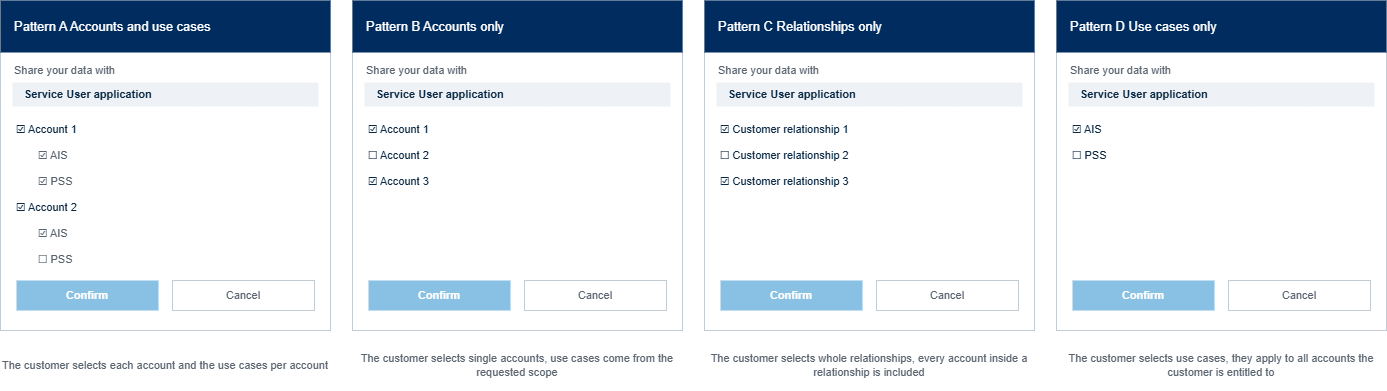
| Pattern | The customer selects | Effect on the consent |
|---|---|---|
| Accounts and use cases | Single accounts, and the use cases per account | A use case can be active for one account and inactive for another |
| Accounts only | Single accounts | The requested use cases apply to every selected account |
| Relationships only | Whole customer relationships | Every account within a selected relationship is included |
| Use cases only | Single use cases | The selected use cases apply to all accounts the customer is entitled to |
| Full scope only | Nothing, the customer accepts or declines the request as a whole | The consent covers the full request, or no consent is created |
The bLink directory does not indicate which pattern an SP uses. SUs should therefore not implement SP-specific logic for the consent page and design their application for a partial selection, which covers all patterns. Recordings of the Consent Flow of individual SPs are linked in the Service Provider Offering.
Requested scope and granted scope
The SU specifies the requested access in the scope parameter of the authorization request. On bLink, a scope refers to an API and a use case of that API and follows the format urn:blink:<api_name>:<use_case>. Depending on the API, a scope distinguishes between read and write access. Write scopes carry the suffix :write and typically include read access.
| Example scope | API | Use case | Access |
|---|---|---|---|
urn:blink:xs2a:ais | Access to Account | AIS | Read |
urn:blink:xs2a:pss:write | Access to Account | PSS | Write |
urn:blink:ow:custmgmt:write | OpenWealth | Customer management | Write |
A scope does not refer to single accounts. All scopes are listed under Scopes.
The decision of the customer affects the consent on two levels.
| Customer decision | Effect |
|---|---|
| Selects or deselects accounts or customer relationships | The scope remains unchanged. The selection defines which resources are accessible under the consent. |
| Deselects a use case entirely | The granted scope can be smaller than the requested scope. In this case, OAuth 2.0 requires the SP to return the granted scope in the token response. |
TODO: Clarify whether SPs reduce the scope when a use case is deselected, or keep the scope without accessible resources. Clarify whether an SU using CaaS receives the granted scope.
As a result, a consent can be valid while no resources are accessible for a use case. For example, a customer grants PSS for two accounts and deselects all accounts for AIS. The consent and the tokens remain valid, and the AIS account list returns 200 OK with an empty list. This is the result of the customer decision and not an error of the Consent Flow.
Token management
After the Consent Flow, the tokens represent the consent. They must be stored securely and refreshed regularly. bLink offers two integration models for this.
| Consent Management 2.0 | Consent Management 2.0 with CaaS | |
|---|---|---|
| Token storage | The SU stores the tokens in its own token store | SIX stores the tokens in CaaS |
| Reference in API calls | Access token | Permission |
| Token refresh | Performed by the SU | Performed by CaaS when an expired access token is used, or on request of the SU with Refresh Permission |
| Admission requirement | Yearly external audit of the token store | Yearly review of the admission criteria |
TODO: Add the link to the refresh endpoint in the CaaS API specification.
For the customer and the SP, both models behave the same. The consent page, the signature and the enforcement of the consent do not change. The differences and the related contracts are described in Consent Management and in the Architecture Guidance for Service Users.
Lifetime of a consent
A consent has no fixed expiry date. It remains active as long as the refresh token can be used to obtain new access tokens. The access token is valid for a short period only. The refresh token has a longer lifetime, which is extended with every token refresh. A regularly used connection therefore remains active without new customer interaction. With CaaS, tokens are deleted after a defined period without activity. The applicable lifetimes are defined in Token Management.
A consent ends in the following cases:
- The customer revokes the consent in the e-banking of the SP.
- The customer revokes the consent in the SU application, or the SU revokes it on its own initiative. In both cases, the SU revokes the consent via bLink.
- The SP deactivates the customer contract or the consent.
- The SU does not use the connection for longer than the lifetime of the refresh token.
- The customer completes a second Consent Flow with the same e-banking login at an SP that allows only one token per e-banking contract. The SP revokes the first token without notification.
- With CaaS, the SU creates a new Permission for the same user ID and SP. CaaS revokes the previous Permission.
If the SP has invalidated the tokens, it rejects the next token refresh with the OAuth 2.0 error invalid_grant. A new Consent Flow is then required. Details are described in Token Management.
Changing and revoking a consent
An existing consent cannot be changed via bLink. Every change of a consent takes place in the e-banking of the SP. The SU can only revoke a consent and start a new Consent Flow.
The customer manages an existing consent in the e-banking of the SP, for example to add or remove accounts or use cases. The SU is not notified of such changes. They become visible in the data returned by subsequent API calls.
The SU can revoke a consent via bLink at any time, for example when the customer disconnects the SP in the SU application. Without CaaS, the SU calls the revoke endpoint, which bLink forwards to the SP. With CaaS, the SU deletes the Permission, and CaaS revokes the tokens at the SP. All SPs support token revocation. A revocation initiated by the SP is not notified to the SU and becomes visible through failing API calls.
The handling of new and closed accounts is not defined uniformly across SPs. The implementation guidelines for Service Providers define that SPs allow customers to manage the consent for all accounts of an e-banking contract, to edit existing consents and to handle account changes automatically. Whether a newly opened account is added to an existing consent therefore depends on the SP. If it is not added automatically, the customer must include the account in the consent in the e-banking of the SP before the SU can access it.
During the lifetime of a consent, resource IDs such as account IDs remain stable, even if the customer adds or removes accounts. A new consent for the same account can result in different resource IDs.
Integration guidance
Service Users integrating the Consent Flow should ensure:
- The requested scope matches the functions the customer uses in the SU application.
- The customer is informed before the redirect which data the application requests and for which purpose.
- The application handles a partial selection and an empty account list as valid results.
- The application contains no SP-specific logic for the consent page.
- The authorization page opens in the browser, not in an iFrame. The content security policy of the SPs blocks iFrames.
- The application tolerates a Consent Flow of up to 30 minutes, after which the flow times out.
- The application supports several connections per customer, as a customer can hold more than one e-banking contract at the same SP.
- The application offers a visible way to start a new Consent Flow after a revocation, an expiry or a change of the consent.
Not every SP supports a Consent Flow started on a smartphone. The current support per SP is listed in the Service Provider Offering.
Related documentation
- Consent Management 2.0 for the detailed flow, error handling and timeouts
- Consent Management 2.0 with CaaS for the Permission lifecycle
- Token Management for token lifetimes and token invalidation
- Service Provider Offering for the capabilities of individual SPs
- Consent Flow & Management for the onboarding perspective