bLink Support Portal – Support Processes
Overview on established Support Processes
All support-related interactions must be conducted exclusively via the bLink Support Portal. This ensures structured communication, efficient handling, and complete traceability.
Requests are initially raised as Service Requests, which are then reviewed by the bLink Support Team. Depending on the topic, impact, and urgency, bLink may reclassify the request as an Incident, Change Request, or Analysis Request to ensure the appropriate resolution process is followed.
bLink’s Role in Issue Coordination
bLink serves as a central coordinator in issues resolution between service users and service providers. End clients must report problems to their service user, who is responsible for raising a ticket via the portal. If needed, bLink will involve the relevant counterparty (e.g., service provider) to facilitate resolution.
Incident Management Process
Reporting Incidents
The Incident Management Process ensures that service-impacting issues are promptly classified and addressed.
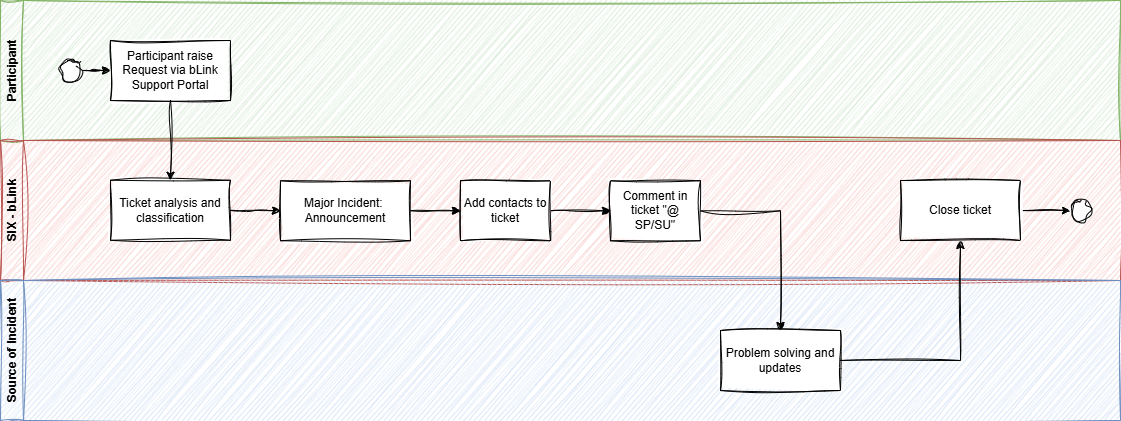
Steps in Handling an Incident
- Submission of the Request
- The service user submits a request via the bLink Support Portal, selecting:
- Priority: "High"
- Category: "Report an Issue or Error" → "Request Error"
- Description: A detailed summary, including timestamps, error logs, and correlation IDs.
- The service user submits a request via the bLink Support Portal, selecting:
- Incident Classification & Coordination
- bLink analyzes the request and classifies it as an incident.
- The request title is updated to include "Incident", ensuring visibility.
- If it is a major incident, bLink publishes an announcement in the bLink Support Portal.
- Involving Relevant Participants
- If the incident involves a service provider, bLink adds their support contacts to the request.
- If multiple participants report related incidents, bLink:
- Defines a "mother case" to consolidate related requests.
- Links all other similar requests and add the affected participants to this mother case for efficient tracking.
- Closes all child cases while all communication will be managed in the mother case
- Resolution & Follow-up
- bLink communicates findings and next steps via the request thread.
- The relevant parties are tagged for action (e.g., "@Participant X: Please analyze").
- The request is updated as the issue progresses until resolved.
Analysis Process
Purpose
Participants may request an analysis of technical or functional behavior when interactions between service users and service providers require investigation.
Steps in Handling an Analysis Request
- Request Submission
- The service user raises a request in the bLink Support Portal, including "Analysis" in the title.
- The request must contain detailed logs, timestamps, and API references.
- bLink’s Role in Coordination
- bLink ensures that the relevant participants are included in the request.
- If necessary, bLink adds the service provider to the analysis request.
- Investigation & Resolution
- The request is reviewed, and bLink initiates actions by tagging relevant participants (e.g., "@Participant X: Please analyze").
- The issue is analyzed collaboratively, with updates provided through the portal.
- If further action is required, the request remains open until resolved.
Change Process
Purpose
This process handles requests for enhancements, including:
- Technical modifications
- Procedural improvements
- Documentation updates
Steps in Handling a Change Request
- Request Submission
- The service user submits a Change Request via the bLink Support Portal.
- The request should include:
- A clear description of the proposed change.
- A proposed timeline for implementation.
- Evaluation & Processing
- bLink reviews the request and determines feasibility.
- The request status is set to "On Hold" while under evaluation.
- Regular updates may be provided as the request progresses.
- Implementation & Closure
- Once a decision is made, the request is either approved and implemented or declined with justification.
- The request is then closed, with relevant participants notified.
Summary of Support Processes
| Process | Description | bLink’s Role |
|---|---|---|
| Incident Management | Handling system issues and critical failures. | Coordinates between service users and service providers, updates request status, and publishes announcements for major incidents. |
| Analysis Requests | Investigating technical or functional behavior. | Ensures relevant participants are involved, facilitates collaboration, and drives resolution. |
| Change Requests | Requesting enhancements or modifications. | Evaluates feasibility, manages updates, and implements approved changes. |